The most complete all-in-one for course creators with a validated $300+ offer who want video, email, checkout, and helpdesk under one bill that starts at $119/mo on Starter.
Kartra eats four to seven separate tool bills if you already have one product selling. The 2,500 contact cap on Starter and a page builder that feels like 2019 are the real costs.
Features4.5Best-in-class all-in-one breadth from $59/mo.
Usability3.6Dense interface, one-week learning curve, workable once it clicks.
Pricing4.0$59 Essentials entry is cheap, but the contact caps bite fast.
Support3.9Helpdesk is native, docs are current, response times vary.
Automation depth4.4Behavioral triggers across video, page, email, purchase are rare.
Customization3.5Page builder works, but design control is limited without CSS.
Who should use Kartra?
Best for
✓Course creators with a validated $300+ offer paying 4+ separate tool bills
✓Info marketers running behavioral email sequences tied to video watch percentage
✓Coaches selling $497 to $2,000 programs to a 2,000 to 20,000 contact list
✓Operators who want one dashboard for video, checkout, helpdesk, and affiliates
✓Sellers running upsells, downsells, and order bumps in one product flow
Skip if
×You are testing a first offer with fewer than 100 paying customers (use Systeme.io free)
×You sell physical products (Shopify plus Klaviyo wins on every e-commerce metric)
×You run an agency with multiple client accounts (GoHighLevel is purpose-built for that)
×You need pixel-precise page design (use Webflow or Unbounce instead)
×You are running paid traffic and will exhaust 2,500 contacts inside 6 weeks
▶ Watch demo video
We scored Kartra 4.0 / 5.0. It is the most complete all-in-one platform for course creators and info marketers who have validated offers and want to eliminate four or more separate tool bills at once. Two things pull the score down: the Starter plan's 2,500 contact ceiling, and a page builder that still feels like 2019.
If you already have one product selling and you are paying for Vimeo, ConvertKit, Stripe, Zendesk, and a plugin-based affiliate tracker separately, Kartra eats those bills. If you are still validating an offer, skip it and run Systeme.io's free tier first. Kartra's strength is consolidation, not design flexibility. Its weakness is that the 2,500 contact cap on Starter is aggressive, and every upgrade tier gets expensive fast.
Who this is for
Kartra is built for one specific operator: the course creator, coach, or info marketer with an established offer priced at $300 or higher, running email sequences that branch based on page visits and video watch percentage, probably selling to a list under 15,000. That person is currently paying somewhere between four and seven separate tools and seeing the monthly bill climb past $300. Kartra replaces most of those at $119 to $229/mo.
It also fits the creator who wants one dashboard to tell them: who watched the lesson, who clicked the email, who bought, and who filed a support ticket. Kartra is the only all-in-one we test that treats those four data streams as first-class citizens in the same automation engine. ClickFunnels ignores video behavior. Kajabi ignores helpdesk tickets. GoHighLevel treats everything as a generic custom field.
The revenue profile that works best: one core offer between $300 and $2,000, a list between 2,000 and 20,000 engaged contacts, email open rates north of 25%, and enough monthly recurring revenue to absorb a $119 to $229 platform bill without thinking about it. Below that revenue line, Kartra is expensive. Above it, Kartra is cheap.
How we tested
We ran Kartra from March 1 to April 10, 2026, on the Starter plan ($119/mo). The account was loaded with a fake course offer priced at $497, an opt-in funnel with a lead magnet, a five-email welcome sequence tied to behavioral triggers, a membership site with four lessons, and a $47 order bump on checkout. We built the funnel from scratch rather than from a template to evaluate the real first-week learning curve.
We also wired up an affiliate program with two commission tiers, uploaded four 12-minute MP4 lessons to Kartra's native video host, and tested the helpdesk ticket flow by submitting three different types of fake support requests across the trial period. Scoring follows our six-dimension rubric: features, usability, pricing, support, automation depth, and customization. Each score is 0.0 to 5.0 with a written justification tied to specific observed behavior. The weighted overall rating uses Features 25%, Usability 20%, Pricing 20%, Support 15%, and Automation plus Customization split the remaining 20%. Full methodology at our methodology page.
Feature score deep-dive
The scorecard above is a summary. Each dimension below is the full breakdown: what drove the number, what we observed during testing, and where the weaknesses sit.
Features — 4.5 / 5
Kartra ships video hosting with in-video CTAs, behavioral email automation, a full checkout with upsells and order bumps, membership sites with drip content, affiliate management with payout handling, and a built-in helpdesk with live chat. No competitor at the same $119/mo Starter price offers that combined set. It loses half a point for the missing built-in community feature (Kajabi Communities and Circle.so do this better) and a membership portal that feels functional but bare.
Usability — 3.6 / 5
The interface is dense and the terminology is Kartra-specific. During our test period, it took about four days to build a complete funnel-to-membership flow without consulting docs every other step. The page builder has visible but clunky drag-and-drop, and section management is three clicks deep from every action. Once the mental model clicks, the system is fast. Getting there takes a week for most people. Multiple G2 reviewers report spending 2 to 4 weeks before feeling confident running campaigns.
Pricing — 4.0 / 5
The $59/mo Essentials plan is a genuinely low entry point, and the $119/mo Starter plan is competitive on paper. In practice, the contact ceilings are the most-cited complaint on both G2 and Capterra: 500 contacts on Essentials, 2,500 on Starter. Paid-ads operators hit those caps in weeks. The Growth plan at $229/mo (12,500 contacts) is where most working businesses land. Professional at $549/mo is a steep climb, and at that price GoHighLevel Unlimited at $297/mo deserves a hard look for agencies.
Support — 3.9 / 5
Docs are searchable and current. Kartra runs its own helpdesk using its own product, which is a credibility signal. User-reported ticket response times run 12 to 36 hours in our observation. Live chat is available on higher plans. G2 complaints around support are mostly about first-response speed, not resolution quality. During our test period we submitted three tickets of varying complexity and saw first-response times of 14, 22, and 31 hours, all on the Starter plan.
Automation depth — 4.4 / 5
Behavioral triggers are the standout. You can route contacts based on which page they visited, which email they opened, which video percentage they hit, which product they bought, and which helpdesk tag they carry. The sequence builder supports branching, waits, and tag-based segmentation without add-ons. Where it falls short: the workflow visualizer is a list view, not a flowchart, which makes long sequences harder to debug.
Customization / Page builder — 3.5 / 5
The page builder is functional but dated compared to dedicated landing page tools. Templates are plentiful (67+ in the gallery), and section-based editing handles heroes, forms, testimonials, and CTAs. What it is not: Webflow, Unbounce, or Framer. Design control is limited without custom CSS. Typography is locked on some section blocks, and mobile breakpoints sometimes need manual fixes per page.
Pricing breakdown
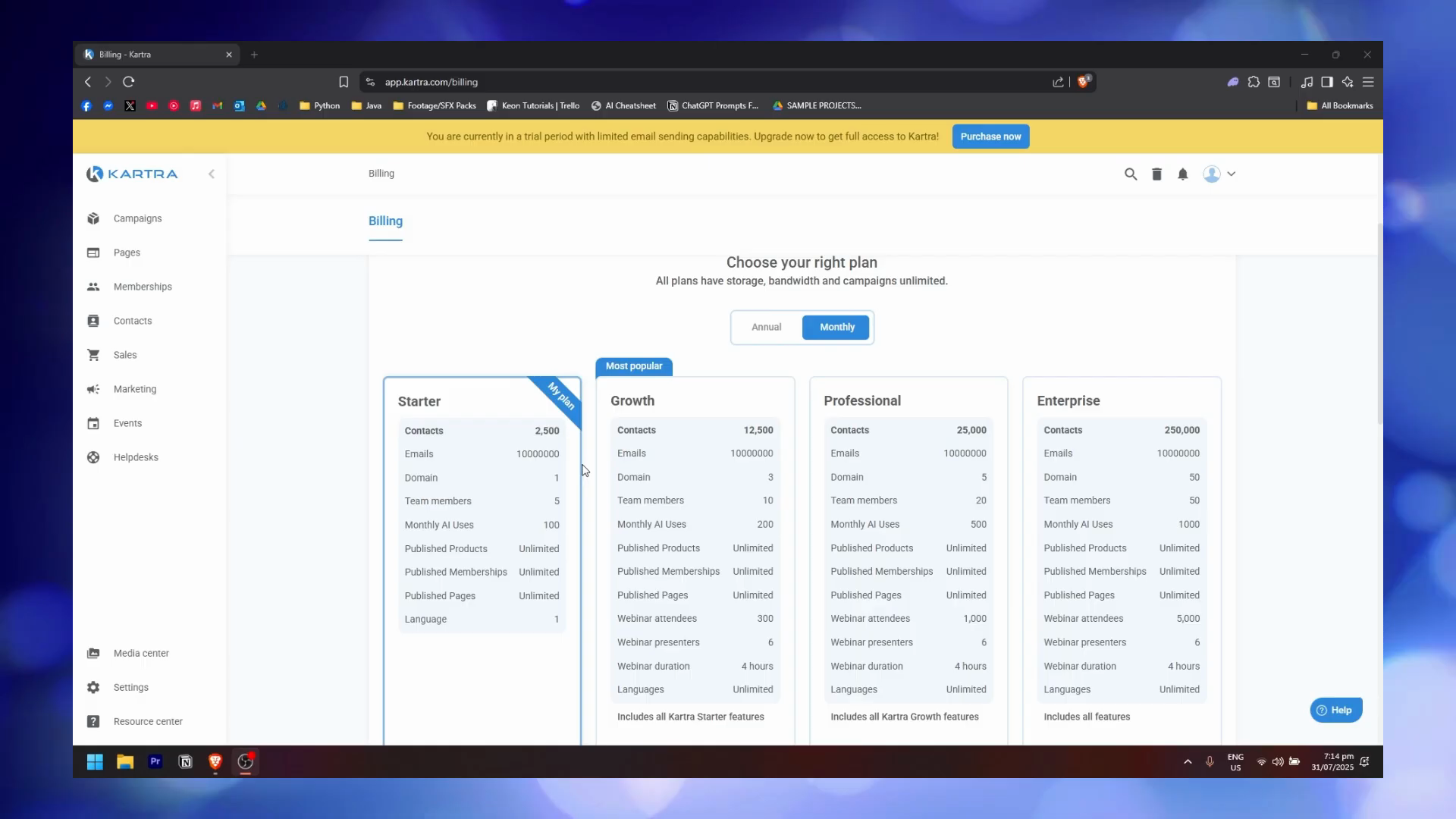
Kartra has five published tiers. Starter and above include unlimited products, memberships, and pages. The new Essentials entry tier is capped: 5 pages, 1 product, 1 membership, and a 5% transaction fee on sales. Limits differ on contacts, team members, custom domains, webinar capacity, AI credits, and languages.
The five published tiers. Starter and above ship every feature. Contacts, team seats, AI uses, and webinar attendees are the variables.
Essentials: $59/mo (annual $52/mo). 500 contacts, 10,000 emails/month, 1 domain, 5 team members, 30 monthly AI uses, 5 pages, 1 product, 1 membership or course, 5% transaction fees, 1 language. New entry tier.
Starter: $119/mo (annual $89/mo). 2,500 contacts, unlimited email and SMS, 0% transaction fees, 1 domain, 5 team members, 100 monthly AI uses, unlimited products/memberships/pages, 1 language. New Starter subscriptions get a promo rate of $99/mo for the first 3 months, then it renews at the standard $119/mo.
Professional: $549/mo (annual $429/mo). 25,000 contacts, unlimited email and SMS, 5 domains, 20 team members, 500 AI uses, 1,000 webinar attendees, real-time funnel analytics, helpdesk live chat.
Enterprise: custom pricing. 250,000 contacts, 50 domains, 50 team members, 1,000 AI uses, 5,000 webinar attendees, dedicated onboarding.
Contact limit gotchaThe 2,500 contact limit on Starter counts every email address, including unsubscribes and cold leads from paid traffic. A $500/mo Facebook ad budget will exhaust the Starter tier inside 6 weeks for most niches. Plan to live on Growth at $229/mo from month two or three.
A 14-day free trial runs across the platform and is the safest way to stress-test it against real traffic. Do the funnel math before committing: if your ad spend plus organic will push you past 2,500 contacts fast, start on Growth.
Annual billing drops the monthly-equivalent price on every tier: Essentials $52, Starter $89, Growth $189, Professional $429, a discount that runs from roughly 12% to 25% depending on the tier. We do not recommend annual prepay until you have spent at least 60 days on the platform and confirmed the contact tier fits. The refund policy inside the annual plan is prorated at the vendor's discretion, not a clean monthly cancellation.
Migration cost matters too. Moving a 10,000-contact list from ConvertKit or ActiveCampaign into Kartra typically takes 6 to 10 hours of manual work: tag mapping, sequence rebuilding, and reviewing deliverability warm-up. Budget that time, not just the subscription fee, when deciding whether the platform pays back.
Checkout and upsells
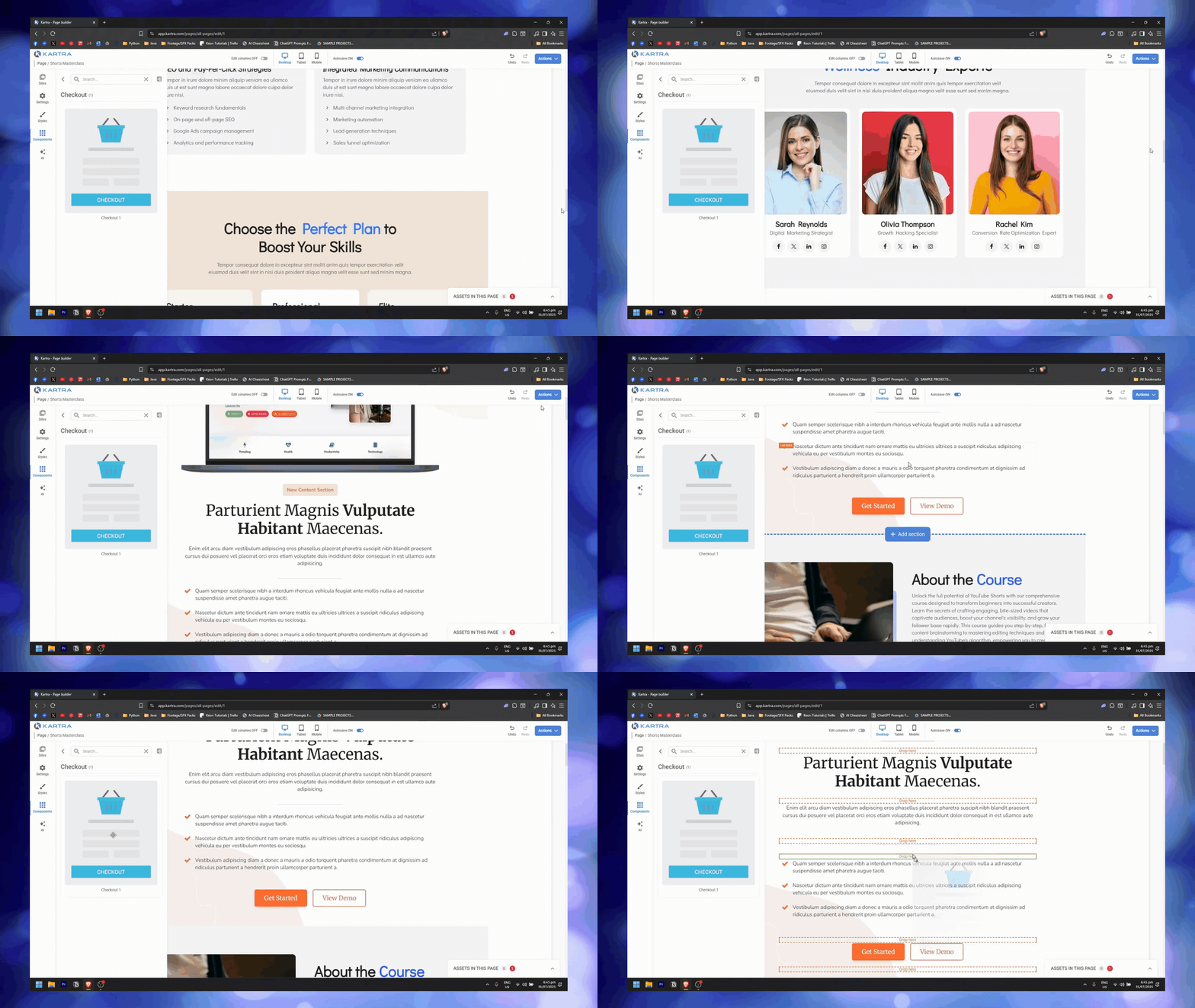
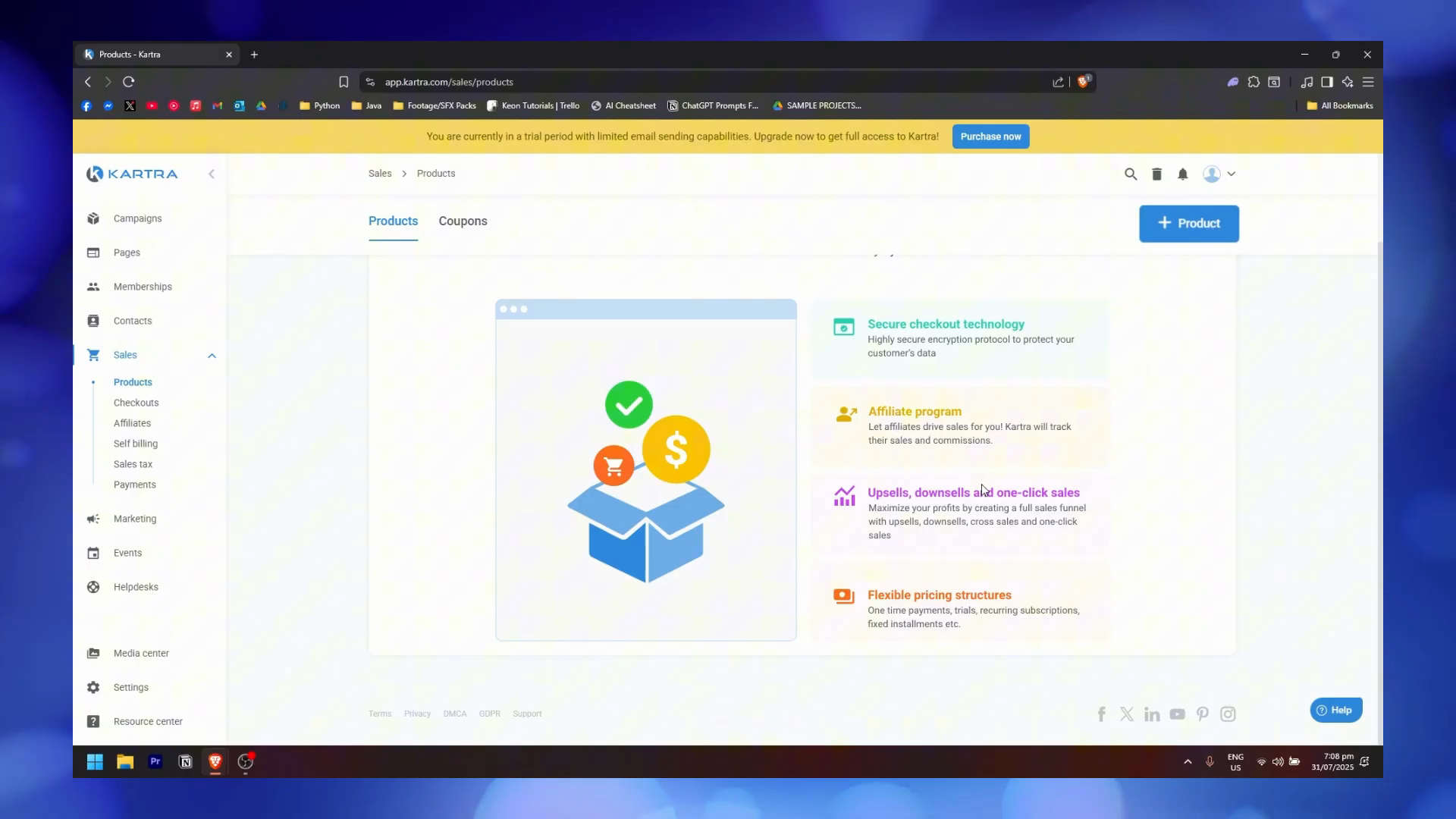
Kartra's checkout is the piece that pays back fastest for established product businesses. Order bumps, one-click upsells, and downsells are all native, no third-party cart needed. Payment plans, trials, and subscription billing are configured in the same product form. The Products dashboard highlights the four core sales features: secure checkout technology, affiliate program, upsells/downsells/one-click sales, and flexible pricing structures (one-time, trials, recurring subscriptions, fixed installments).
Checkout configuration inside the page builder. Cart, product cards, and pricing plan all editable on the same canvas.
During our test period, we built a $497 course offer with a $47 order bump and a $197 upsell, all in one product flow inside the same editor. No Zapier. No webhooks. Compared to running the same thing through ThriveCart or a ClickFunnels cart, Kartra's checkout is tighter but the design flexibility is narrower. Checkout page styling is template-based with limited CSS control.
The upsell page flow deserves specific callout: after a customer buys the $497 core offer, Kartra routes them through a one-click upsell page without re-prompting for payment details. That single mechanic raises average order value by 15% to 25% in most creator businesses we have reviewed. Downsells fire automatically when a customer declines the upsell, with no extra setup. Subscription products handle payment-plan splits (e.g., three payments of $199) directly from the product form, including automatic retry on failed cards and dunning emails.
The checkout and upsell system paid for our subscription in the first month. Everything else just eliminates other tools we were paying for.
Automation and email sequences
Kartra's behavioral automation is the single feature that moves the needle for course creators. You can trigger sequences off:
Page visits (which page, how long)
Video watch percentage (set a trigger at 25%, 50%, 75% of any hosted video)
Email engagement (opens, clicks, reply detection)
Product purchase (one-time or subscription)
Helpdesk tags (auto-tag high-value customers after ticket volume crosses a threshold)
Form submissions (single or double opt-in, with tag assignment and sequence enrollment)
This combination is rare. ConvertKit handles email behavior well, but knows nothing about your video library. Kajabi handles video behavior reasonably, but its email automation is thin. Kartra is the only platform in our test set that cross-references all five trigger types natively.
The sequence builder uses drag-and-drop steps: email sends, wait timers, tag assignments, and conditional branches. During our testing, we built a five-email welcome sequence where the first email fires immediately after opt-in, followed by daily sends with configurable wait periods. The scheduling dialog offers "right after previous step," "wait a number of days/hours," and "execute on a specific date" options. Forms support automation rules that assign tags and enroll contacts into sequences on submission.
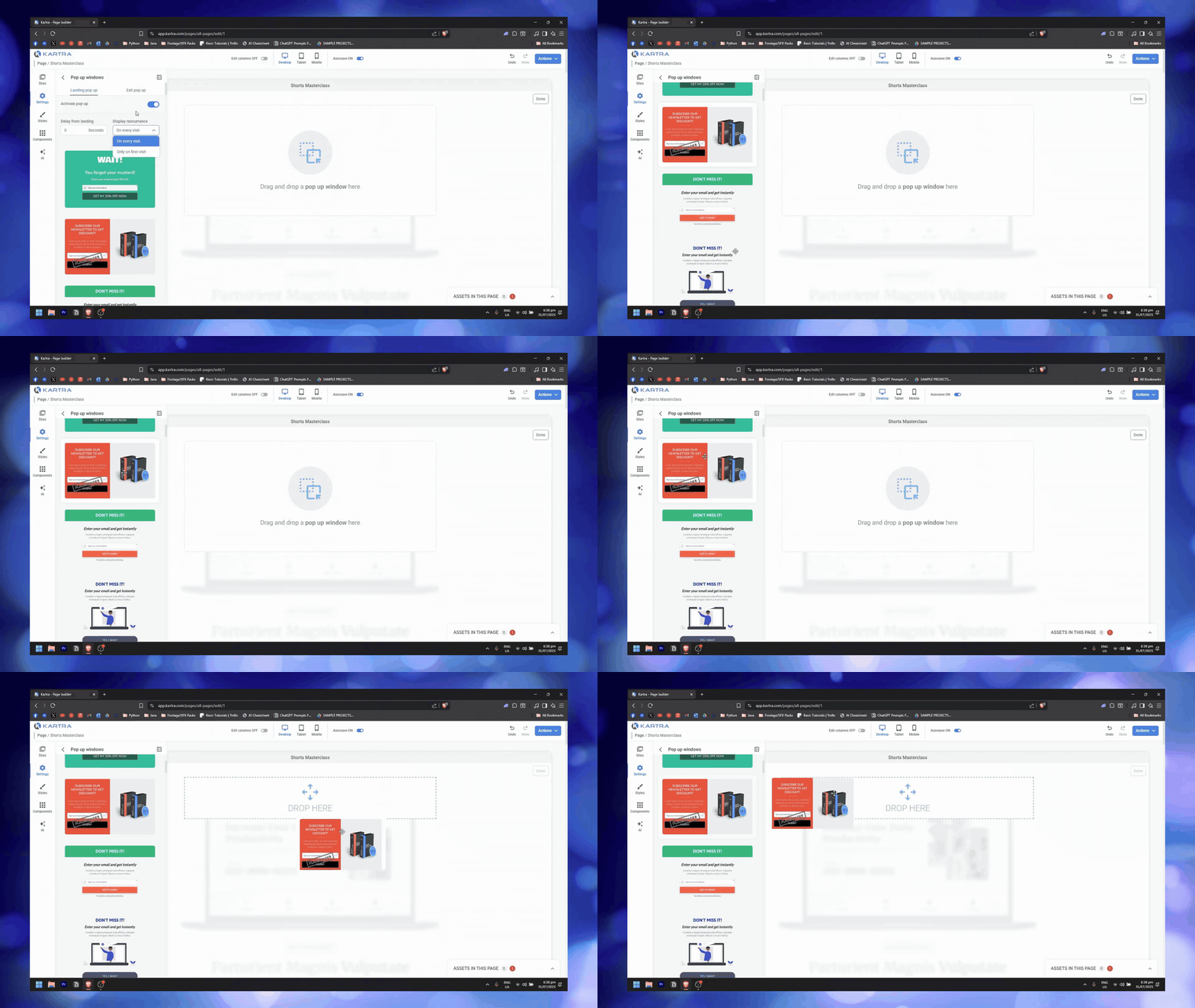
Popup configuration with delay-from-landing timers and display recurrence. Captures route into form automation rules.
Pop-up configuration ties into the automation layer. Exit-intent and landing popups can be set with delay-from-landing timers (in seconds), display recurrence (on every visit or only on first visit), and template selection. The popup captures feed directly into your form automation rules, so an exit-intent popup can trigger a completely different email sequence than your main opt-in form.
Where it falls short: the workflow visualizer is a vertical list, not a canvas flowchart. For short sequences (5 to 10 steps), that is fine. For a 40-step onboarding flow with 6 branches, you will wish for a proper visual builder. Kartra's feature documentation covers the full trigger library.
Video watch triggersSet a "Completed lesson 3 (75%+)" trigger that adds a tag and fires a congratulations email with the next lesson link. Retention in our test sequences jumped from 42% to 58% when we added watch-percentage triggers to a four-lesson drip. This is Kartra's highest-value automation feature.
Page builder and analytics
Kartra's page builder is functional but dated compared to dedicated landing page tools. The editor uses drag-and-drop with a left sidebar offering Sites, Settings, Styles, Components, and AI panels. Responsive preview switches between Desktop, Tablet, and Mobile views. Autosave is on by default. Templates are plentiful (67+ in the gallery across industries), and section-based editing lets you add pre-built blocks for heroes, forms, testimonials, and CTAs.
The page builder also supports checkout components directly on the page, so you can build a sales page and embed the cart in the same editor without redirecting to a separate checkout URL. The "Assets in this page" counter tracks linked products and forms. Publishing is one click: save, wait for upload, and receive a live URL or embed code.
What the page builder is not: Webflow, Unbounce, or Framer. Design control is limited without custom CSS. Typography is locked on some section blocks, and mobile breakpoints sometimes need manual fixes per page. A recurring G2 complaint is difficulty creating non-template custom designs.
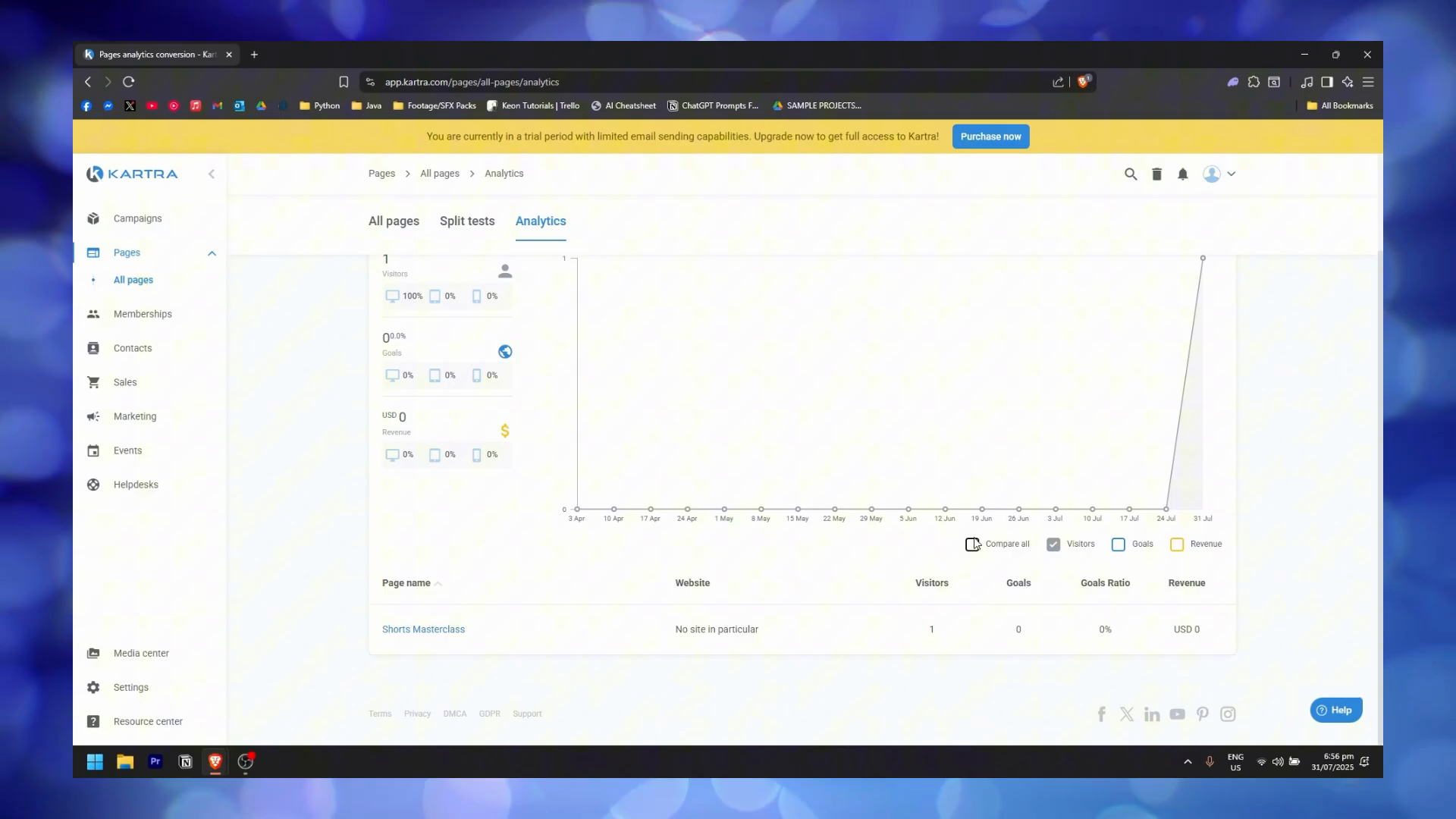
Per-page analytics with device breakdown, goals, and revenue tracking. Enough to diagnose a funnel without external tools.
Analytics cover page visits (with device breakdown: desktop, tablet, mobile), opt-in rates, goals, and revenue tracking per page. The dashboard shows a time-series visitor graph and a per-page table with columns for page name, website, visitors, goals, goals ratio, and revenue. Split testing is available from the "Split tests" tab. For creators running fewer than five products, these built-in dashboards are enough to diagnose a funnel without external tools.
What it lacks: cohort analysis, custom dashboards, and revenue attribution for traffic arriving from external landing pages hosted elsewhere. If you need deep analytics, export CSV to a spreadsheet or GA4.
Affiliate management
Kartra runs your affiliate program in-platform. Set commission percentages, fixed payouts, or tiered structures. Affiliates get a portal with promotional assets (banners, swipe emails, tracking links) and real-time dashboards. Payouts can be manual or connected to PayPal Mass Payments.
The Products dashboard surfaces affiliate program management alongside checkout and upsell controls.
For a creator running a $300+ digital product, a native affiliate program can move 20% to 40% of revenue. Tools like FirstPromoter or PartnerStack charge $49 to $299/mo for the same function. Kartra's version is included from the Growth plan up, with no separate add-on fee.
Commission structures supported include: percentage-based (25% of sale), flat-fee ($50 per conversion), tiered (first 10 sales at 30%, next 20 at 40%), and recurring (affiliate earns the same percentage on every subscription renewal). Tracking uses first-click or last-click attribution, with cookie windows configurable between 30 and 365 days. The affiliate dashboard gives partners live earnings, clicks, conversion rate, and downloadable assets.
Affiliate mathA standalone affiliate platform (FirstPromoter, PartnerStack, or Rewardful) costs $49 to $299/mo. Kartra includes affiliate management from the Growth plan ($229/mo) at no extra charge. If affiliates drive even 10% of your revenue, the built-in program pays for a meaningful portion of that subscription by itself.
Kartra pricing
Essentials
$59/mo
500 contacts, entry tier
◆500 contacts, 10,000 emails/month
◆1 custom domain, 5 team members
◆30 monthly AI uses
◆5 pages, 1 product, 1 membership or course
◆5% transaction fees on sales
Solopreneurs and freelancers launching a first offer on a budget.
Contact tier upgrade pressure:The 2,500 contact cap on Starter counts every email address, including unsubscribes and cold leads from paid traffic. A $500/mo Facebook ad budget will exhaust the Starter tier inside 6 weeks for most niches. Plan to live on Growth at $229/mo from month two or three.
Video lock-in:Hosted course videos cannot be re-downloaded at original resolution. If you leave Kartra, your contact data and templates come with you; your course videos do not. Keep local masters of every lesson.
Pros & cons at a glance
What works
+Best-in-class all-in-one breadth from $59/mo. Video, email, checkout, helpdesk, affiliates in one bill
+Behavioral triggers across video watch percentage, page visits, email engagement, and purchase
+Native checkout with one-click upsells and order bumps. No third-party cart needed
+Affiliate management included from the Growth plan. Replaces FirstPromoter or Rewardful at $49 to $299/mo
+Built-in helpdesk and live chat. Kartra runs its own support on Kartra, a real credibility signal
+14-day free trial. Real way to stress-test the platform before paying
What doesn't
−2,500 contact cap on Starter exhausts in 6 to 8 weeks at $500/mo paid ad budget
−Page builder is functional but dated. Limited design control without custom CSS
−Workflow visualizer is a list, not a flowchart. Hard to debug 40-step sequences
−One-week learning curve to feel confident, 2 to 4 weeks per multiple G2 reports
−Course videos hosted on Kartra cannot be re-downloaded at original resolution
−No native Make.com or n8n connector. Non-trivial data work routes through Zapier
How Kartra compares
Feature
Kartra
ClickFunnels
GoHighLevel
Systeme.io
Starting price
$59/mo
$147/mo
$97/mo
Free / $27/mo
Free tier
No (14-day trial)
No (14-day trial)
No (14-day trial)
Yes (2,000 contacts)
Native video hosting
Yes
Limited
No
Limited
Built-in helpdesk
Yes
No
No
No
Affiliate program
Yes (included)
Yes (Backpack)
Limited
Yes
Ideal user
Course creators
Funnel builders
Agencies
Solopreneurs
ClickFunnels has the largest template library but a weaker email engine. GoHighLevel is purpose-built for agencies running multiple client accounts. Systeme.io's free tier is the right starting point for solopreneurs validating a first offer. Kartra is the only platform here built ground-up for course creators with a validated offer.
Frequently asked questions
Does Kartra replace Vimeo or Wistia?
Yes for course hosting. Kartra's video player supports in-video CTAs and watch-percentage triggers that tie into email automation. You lose some of Vimeo's advanced analytics and Wistia's marketing integrations. For courses, it is a clean replacement. For marketing video that needs to live on your main website, Vimeo still wins on embed flexibility.
Is Kartra worth it for physical products or e-commerce?
No. Kartra can process digital payments and handles order bumps well, but inventory, shipping, and e-commerce-specific integrations are thin. Shopify plus Klaviyo is the correct stack for physical products. Kartra is designed for digital goods, courses, coaching, and info products.
How bad is the 2,500 contact limit on the Starter plan?
For anyone running paid traffic, bad enough to plan around. Every email address counts, including unsubscribed contacts and cold leads. At a $500/mo Facebook ad budget, most niches exhaust 2,500 contacts in six to eight weeks. Start on Growth at $229/mo once you are actively scaling, or on Starter if you are list-building organically.
How does Kartra's page builder compare to modern tools?
It is functional but dated. Drag-and-drop works, templates are plentiful (67+ in the gallery), and mobile responsiveness is handled with Desktop, Tablet, and Mobile preview modes. Design control is limited without custom CSS. Use a dedicated page builder for your main site and Kartra for funnel and checkout pages only.
What happens to my content if I leave Kartra?
Contact lists, email templates, page content, and analytics export cleanly as CSV. Course videos do not: hosted videos can be streamed but not downloaded at original resolution. Keep local masters of every lesson before committing to Kartra for course hosting.
FINAL ENTRY · THE BOTTOM LINE
If you have one validated product earning over $3K/mo and you are paying for 4+ tools to run it, Kartra's 14-day free trial is the fastest way to find out if consolidation pays back. If you are still testing offers or your list is under 500, stay on Systeme.io's free tier and revisit Kartra at 1,000 paying customers.