Free
$0/mo
Up to 500 contacts
- Email newsletters
- 1 landing page
- Website builder
- Signup forms
- Connect a custom domain
Validating list-building before paying for anything.
Start free trial →
GetResponse
Best fit for solopreneurs and small businesses who want one tool for email plus landing pages plus webinars instead of stitching three subscriptions together. Real cost lands $19 to $69/mo depending on automation depth and whether you need webinars, with annual billing shaving 18%.

This page contains affiliate links. We may earn a commission if you purchase, at no extra cost to you. This does not influence our rating.
Disclosure: Some links below are affiliate links. We may earn a commission at no cost to you. How we review.
Tested over March 1 – April 10, 2026. Methodology →
Best for
Skip if
GetResponse is one of the oldest names in email marketing, founded in 1998 and now used by over 350,000 businesses across 183 countries. The product has grown well past its autoresponder roots into a bundle of email, landing pages, marketing automation, webinars, and conversion funnels at a single subscription price. The pitch is consolidation. Instead of paying separately for an email tool, a landing page builder, and a webinar platform, you get all three from $19/mo.
We tested the platform from March 1 to April 10, 2026 on the Creator plan. The setup target was a real lead generation funnel: Facebook ads to a landing page, 10-email welcome sequence with behavioral branching, and a live webinar at the end. End-to-end build time was about four hours.
Overall rating: 4.2 / 5. The math works for solopreneurs and small businesses that want fewer tools and a smaller bill. It does not work for high-volume ecommerce or operators chasing the deepest automation logic on the market.
GetResponse fits a specific reader. If you run a service business or sell digital products as a solopreneur, and your current stack is some combination of Mailchimp plus Leadpages plus Zoom or WebinarJam, the spreadsheet tells you to switch. The Starter plan at $19/mo replaces Mailchimp at a similar price with more landing-page capability. The Creator plan at $69/mo replaces Mailchimp plus a separate webinar tool that would run another $40 to $100/mo on its own.
If you run a high-volume ecommerce store, the math points elsewhere. Klaviyo and Drip are built ground-up for product catalogs, abandoned cart attribution, and revenue tracking that GetResponse handles only at the surface level. Same story if your retention strategy depends on deeply nested conditional automation. ActiveCampaign wins that bracket.
The clearest signal you are in the right zone is the number of marketing subscriptions on your credit card statement. If you can draw a line through two or three of them and replace with one $19 to $69 line item, this is the tool.
We ran GetResponse on the Creator plan from March 1 to April 10, 2026. The test scenario built one full lead funnel for a service-based business: AI-generated landing page, 10-step welcome email sequence with conditional branching by open behavior, contact scoring, and a webinar with registration page and automated reminders. We tracked deliverability, time-to-build, and live support response times across the period.
Scoring follows our six-dimension rubric: features, usability, pricing, support, deliverability, and automation depth. Each score is 0.0 to 5.0 with a written justification tied to specific observed behavior during the test. The weighted overall rating uses Features 25%, Usability 20%, Pricing 20%, Support 15%, with Deliverability and Automation splitting the remaining 20%. Full methodology at our methodology page.
The scorecard is a summary. Each dimension below explains what drove the number, what we observed during testing, and where the weak spots sit.
GetResponse bundles email, landing pages, marketing automation, webinars, and conversion funnels into one platform. During testing we ran a 10-step welcome sequence with behavioral branching, hosted a webinar, and built a four-step funnel without leaving the dashboard. Page builder and ecommerce features lag behind dedicated tools (Unbounce, Klaviyo), but the consolidation is real for a stack that starts at $19/mo.
Setup of the Facebook ads to landing page to 10-email sequence funnel took about four hours start to finish during our test, with no support ticket required. The interface looks dated next to ConvertKit or Beehiiv but the navigation is logical and feature labels match competitor terminology. The template gallery contains visible duds among the 200+ options and you will spend time filtering.
Starter at $19/mo for 1,000 contacts includes unlimited email sends, a landing page builder, signup forms, and the AI content tools (capped at 3 uses). That is the inflection point and still strong value in the category at this price band. Marketer at $59/mo adds unlimited automation workflows and contact scoring. Creator at $69/mo adds webinars (100 attendees) and the course builder. Annual billing saves 18%. Cost rises with list size, so price the platform out at your projected contact count before committing.
Live chat is available 24/7 in eight languages and replies inside two minutes during our test window. Phone support is included only on the Enterprise plan. Documentation is thorough but G2 reviewers consistently flag slow email-ticket response times when chat is offline. The community is small compared to ActiveCampaign or HubSpot, so most learning happens through vendor docs and YouTube rather than peer forums.
GetResponse runs proprietary sending infrastructure with active reputation management and claims a 99% deliverability rate. During our six-week test, open rates on cold traffic landed above the 21% small-business average reported by Mailchimp benchmarks. The Perfect Timing send feature delivers each email when the subscriber historically opens, which added a measurable lift without configuration. Twenty-five years of sender reputation history is the moat here.
The visual workflow builder handles if/then logic, contact scoring, tagging, and event-based triggers. Multi-step welcome sequences and abandoned cart flows are straightforward to build. Power users chasing deeply nested conditional logic or revenue attribution will find ActiveCampaign more capable, but GetResponse covers roughly 90% of real-world solopreneur and small-team use cases.
The headline $19/mo number is real, but the plan you actually need depends on whether webinars and advanced automation matter to your funnel. Two variables move the cost above the sticker price: which tier unlocks the feature you bought the platform for, and how big your contact list grows.
Starter at $19/mo covers email plus a landing page builder plus one automation workflow plus the AI content tools, capped at 3 uses. For a solopreneur running a simple welcome sequence and a couple of opt-in pages, this is the right starting point. Marketer at $59/mo unlocks unlimited automation workflows, contact scoring, event-based triggers, abandoned cart recovery, and sales funnels. This is the tier marketers and ecommerce sellers typically land on. Creator at $69/mo adds webinars (100 attendees), a course builder for up to 500 students, and premium newsletter subscriptions.
All figures verified against the current GetResponse pricing page. Annual billing shaves 18% off every tier, putting Starter at $15.58/mo, Marketer at $48.38/mo, and Creator at $56.58/mo; if your usage is steady, the annual contract is the clean win.
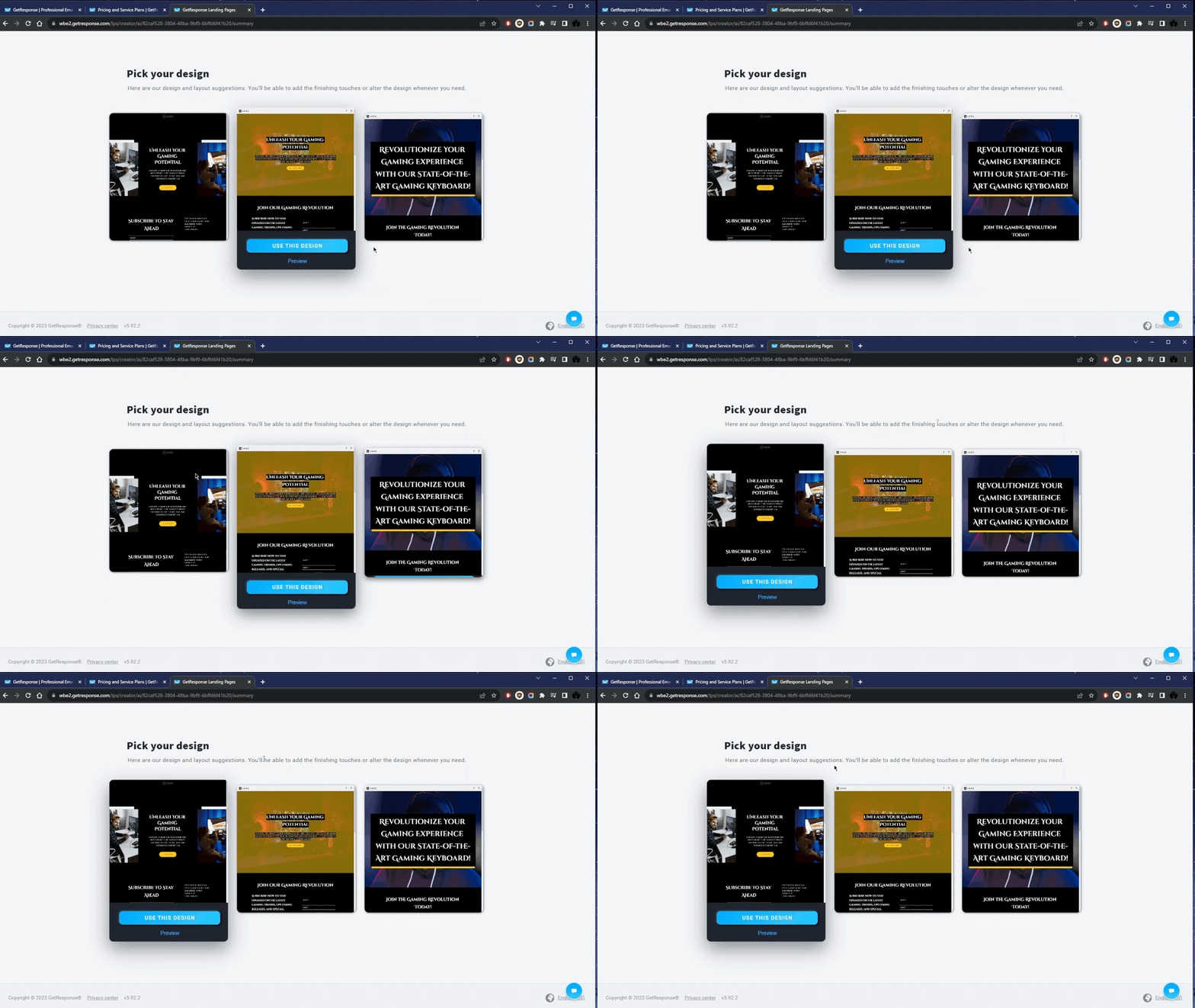
The landing page builder is the second-most important feature after email and the place we spent the most setup time. The AI builder asks for your industry and product description, then returns three template designs with a Use This Design button to load each into the editor. During our test we built and published a working page in about 25 minutes including custom copy edits, image swaps, and a mobile-view check.
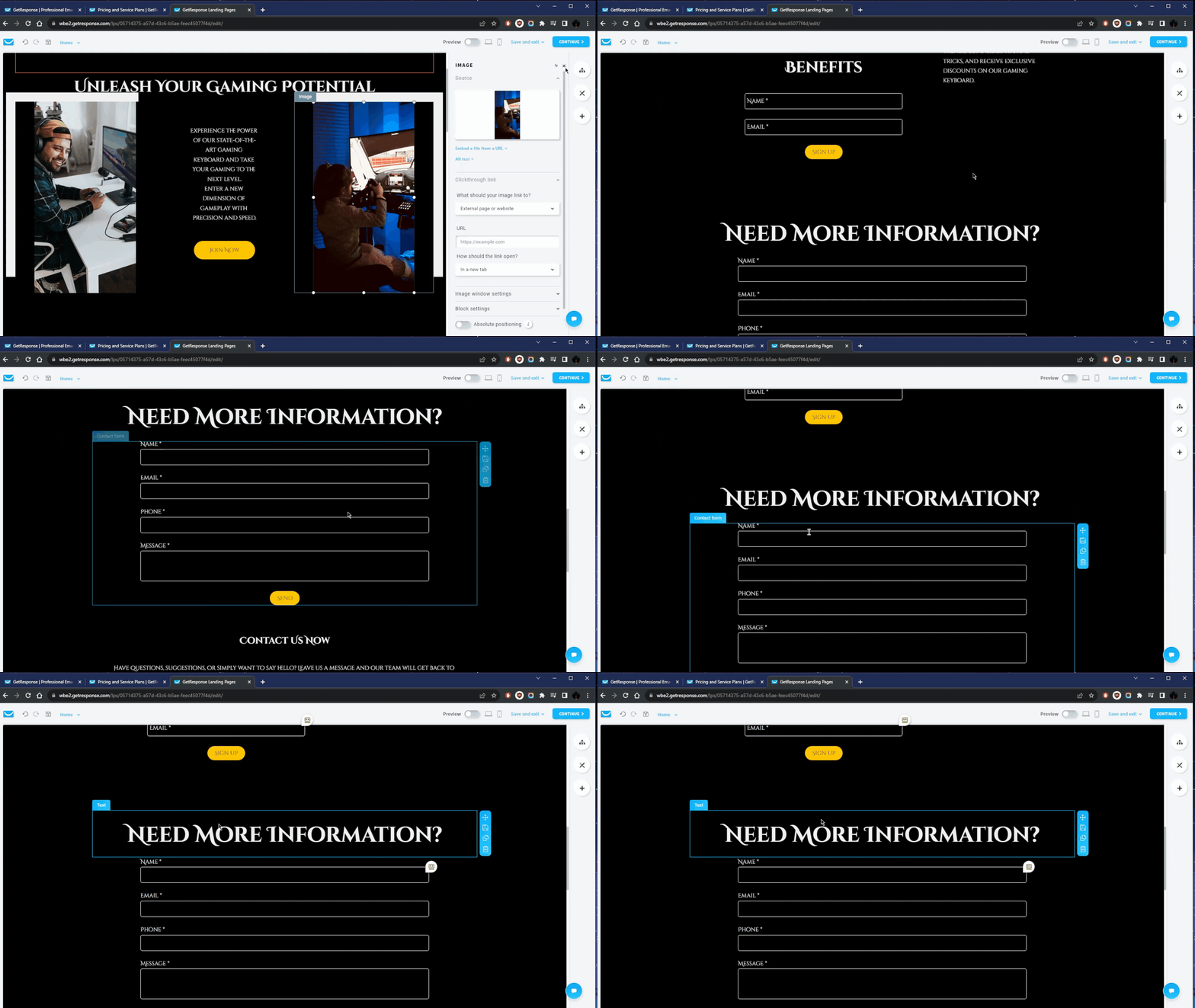
The block-level editing is competent. Click any block and the side panel loads its settings: replace image, change text, adjust spacing, swap typography. Pre-built blocks cover sign-up form, contact form, gallery, list, video, and chat. The Mobile View Optimizer tunes heading sizes and padding for phone layouts independently of desktop, which is handy and not always present at this price tier.
The webinar tool is the genuine differentiator. No major email platform at this price tier (Mailchimp, ConvertKit, ActiveCampaign) bundles webinar hosting. We ran a live session during the test on the Creator plan and it handled registration, automated reminder emails, the live broadcast, and post-session recording without dropouts. Attendee polling and Q&A worked. There were no breakout rooms or advanced facilitation tools, so workshop-style sessions are not the right fit, but for a presentation-and-pitch flow this removes the need for a separate Zoom Webinar or WebinarJam subscription.
The math: a separate webinar tool runs $40 to $100/mo standalone. Folding it into the Creator plan at $69/mo turns webinars into a feature you do not pay extra for, which is the single largest cost savings the platform delivers.
Switching to GetResponse let us cancel ConvertKit and WebinarJam in the same week. The savings paid for the next two years of the platform.
The visual workflow builder uses drag-and-drop nodes for triggers, conditions, actions, and time delays. During testing we built a 10-step welcome sequence with conditional branching by email open status: opens get a deeper sequence, non-opens get re-engagement, both branches converge on a webinar invite. Build time was under an hour. Contact scoring lets you tag and segment based on open, click, page visit, and purchase behavior.
Deliverability held up across the test. Open rates on cold traffic landed above the 21% small-business average reported in Mailchimp's industry benchmarks. The Perfect Timing feature, which sends each email when the subscriber historically opens, added a measurable lift on the second campaign of the test without any extra configuration. Proprietary sending infrastructure plus 25+ years of sender reputation is the moat the platform genuinely earns.
Live chat is the strongest support channel. It is available 24/7 in eight languages and we got responses inside two minutes every time we used it during the test. Phone support is included only on the Enterprise plan, not on Starter, Marketer, or Creator. Documentation is thorough, well-organized, and covers most setup flows, though some advanced automation walkthroughs route back to a chat agent rather than a self-serve guide.
The peer community is small compared to ActiveCampaign or HubSpot. Most operator-to-operator learning happens through vendor docs and YouTube tutorials rather than active forums or Facebook groups. If you are coming from a tool with a noisy user community, this will feel quiet, but the official channels carry the weight.
Free
$0/mo
Up to 500 contacts
Validating list-building before paying for anything.
Start free trial →Starter
$19/mo
1,000 contacts
Solopreneurs and small businesses running email plus landing pages.
Start free trial →Marketer
$59/mo
1,000 contacts
Marketers and ecommerce sellers who need deeper automation.
Start free trial →Creator
$69/mo
1,000 contacts
Coaches and creators who sell courses, webinars, or paid newsletters.
Start free trial →Enterprise
Custom
Large lists, tailored quote
High-volume senders needing dedicated infrastructure and SSO.
Start free trial →On top of plan price
What works
What doesn't
| Feature | GetResponse | Mailchimp | ActiveCampaign | ConvertKit |
|---|---|---|---|---|
| Starting price (paid) | $19/mo | $13/mo | $15/mo | $25/mo |
| Landing pages included | Yes (unlimited) | Limited | Yes | Yes |
| Webinar hosting | Yes (100-1000 attendees) | No | No | No |
| Conversion funnels | Yes | No | No | No |
| Automation depth | Strong | Basic | Best-in-class | Moderate |
| Free plan | Yes (500 contacts) | Yes (500 contacts) | Trial only | Yes (1,000 contacts) |
Mailchimp and ActiveCampaign both start cheaper than GetResponse's $19/mo Starter plan, but trade away webinars and bundled funnels. ActiveCampaign wins on automation sophistication for power users. ConvertKit is the cleaner pick for creators who only need email. GetResponse is the only platform here that bundles webinars and funnels into its own plan lineup.
FINAL ENTRY · THE BOTTOM LINE
No credit card required. Free plan includes 1 landing page and the website builder.
“GetResponse handles email and landing pages in one place. Simplified my workflow.”
“The automation builder took some learning, but once I understood it, setup was straightforward.”